



A greeting card becomes a little story
A message doesn't have to fit on a single card view.
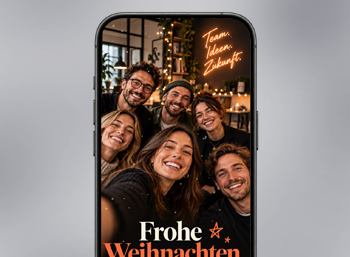
With the Mobile scroll card, you guide your recipients through your content step by step. Every swipe opens a new screen - with its own image, text, video or mood.
That turns a digital card into a short, interactive brand experience that works especially well on a smartphone.
Your story. Screen by screen.
You decide how extensive your Mobile scroll card should be. Alongside the intro, further screens can be shown or hidden as you like.

A typical structure: opening, content, personal greeting and closing - each with its own image, text or video.
- Intro: The first impression. A bold image or video, plus a short message such as "Merry Christmas".
- Story: Room for content. A year in review, a thought or a message, combined with images and collages.
- Personal greeting: An individual salutation with greeting text, profile picture and signature of the respective sender – personalized automatically.
- Highlight: A special moment. A team photo, a project, a key number from the year or a short video.
- Mood: Atmosphere instead of information. A full-screen image or video, a deliberate shift between light and dark screens, with sound if you like.
- Closing: The final screen with sender, signature and logo, optionally with one or two buttons, for example to your website or a fundraising campaign.
This creates a clear narrative arc without overloading your recipients with too much content.
MOBILE FIRST
Made for the smartphone
The Mobile scroll card was developed from the ground up for mobile use.
On a smartphone, the card fills the available screen. A single swipe takes you straight to the next screen. Images and videos can be used full-screen, and text stays compact and easy to read.
The story works on desktop and tablet as well: there the card appears in smartphone format and can be framed by a custom-designed background if you wish.
- Mobile first
For an experience that feels natural on a smartphone. - Responsive display
Optimized font sizes and content across different screen sizes. - Desktop included
With optional colors, images, videos and animated backgrounds around the card.


ANIMATION
Motion that supports your story
Don't just click through - experience it.
A range of image and text animations is available for the transitions between screens. Images can cross-fade, fan out or appear from different directions, for example. Text can build up word by word, fade in or emerge from a mask.
You decide whether all screens follow one shared animation or individual scenes are deliberately staged differently.
The story can also be played automatically if you like. Your recipients can take over at any time and move on by swiping, using the mouse wheel or the arrow keys.
IMAGE, VIDEO & SOUND
Images, video and sound create atmosphere
Some messages need more than words.
Use large-format images or embed videos directly into individual screens. Overlays keep your message clearly legible, even on richly detailed visuals.
You can also add background music to your story. Your recipients decide for themselves whether to switch the sound on.
That way a Christmas card, a thank-you or a year in review can become an experience that combines image, motion and sound.


PERSONALIZATION
Personal - even with large recipient lists
Strong design works even better when the message is personal.
The Mobile scroll card combines the visual experience with the personalization features of Power eCard. Individual salutations, names and sender details can be inserted automatically.
If you wish, the personal profile picture and signature of the respective sender can appear as well.
That way every recipient receives a high-quality digital card - and it still feels personal.
CORPORATE DESIGN
It fits your brand - not the other way round
The Mobile scroll card can be fully adapted to your corporate identity.
Choose from ready-made color palettes or use your own corporate colors. Combine light and dark screens, use your own fonts and place your logo and brand mark deliberately within the story.
Even small details such as accent colors, button shapes, transitions or text positions can be customized.
The result: an interactive eCard that doesn't feel like a standard template, but like part of your brand.
One story, many occasions
The Mobile scroll card is ideal wherever a single card view isn't enough.
Whether Christmas greetings, a year in review, a thank-you, an anniversary, customer communications or a special company message: several screens give you room to combine information and emotion - without turning it into a long email.
For Christmas cards in particular, you can bring together a look back, a word of thanks, personal greetings and a look ahead in a single digital story.

See for yourself how images, motion and a personal message come together to create a digital card that people remember.
Quick answers
- What is the Mobile scroll card?
The Mobile scroll card is a mobile-first eCard template from Power eCard. Your content is spread across up to six full-screen views, which your recipients move through by swiping or clicking.
- Can I use my own images and videos?
Yes. You can embed your own images and videos directly into the individual screens and combine them with text, overlays and animations.
- Can I adapt the Mobile scroll card to our corporate identity?
Yes. Colors, fonts, logo, brand mark, buttons and many other design elements can be configured individually.
- Can recipients be addressed personally?
Yes. Personal salutations and recipient data can be inserted into the greeting text automatically. You can also use personal sender details, profile pictures and signatures.
- Does the template work on desktop as well?
Yes. On a smartphone, the story uses the full available screen. On desktop and tablet it appears in a compact portrait format and can be set off with a custom page background.
- Do recipients have to move through the story themselves?
Not necessarily. The story can be navigated manually or, optionally, played automatically. As soon as recipients move on themselves, they take over control.


